Your server
Live prices
How to use it
- In My prices, enter what you buy and sell at on your server.
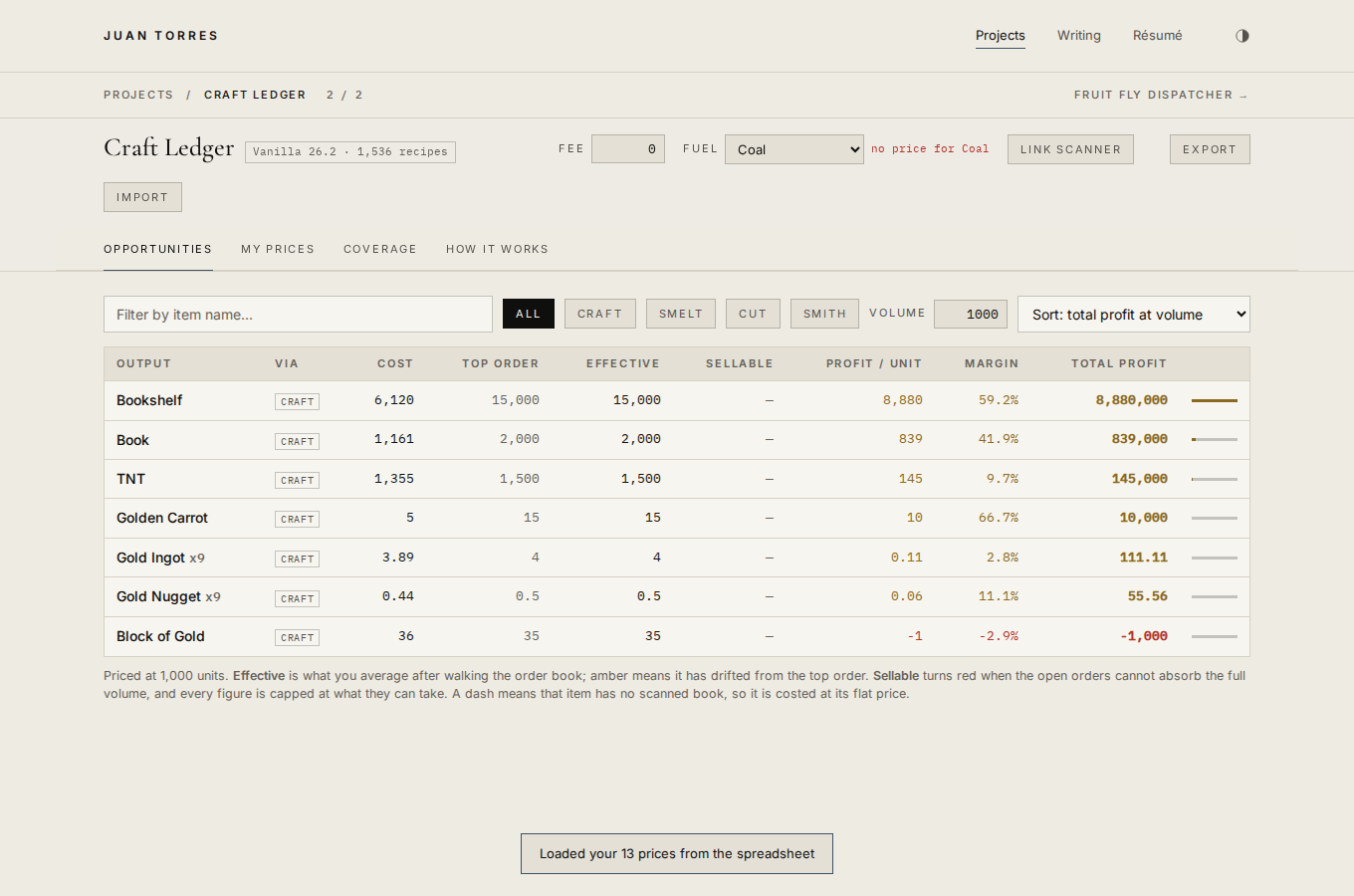
- Opportunities ranks every recipe you can now price by what it pays.
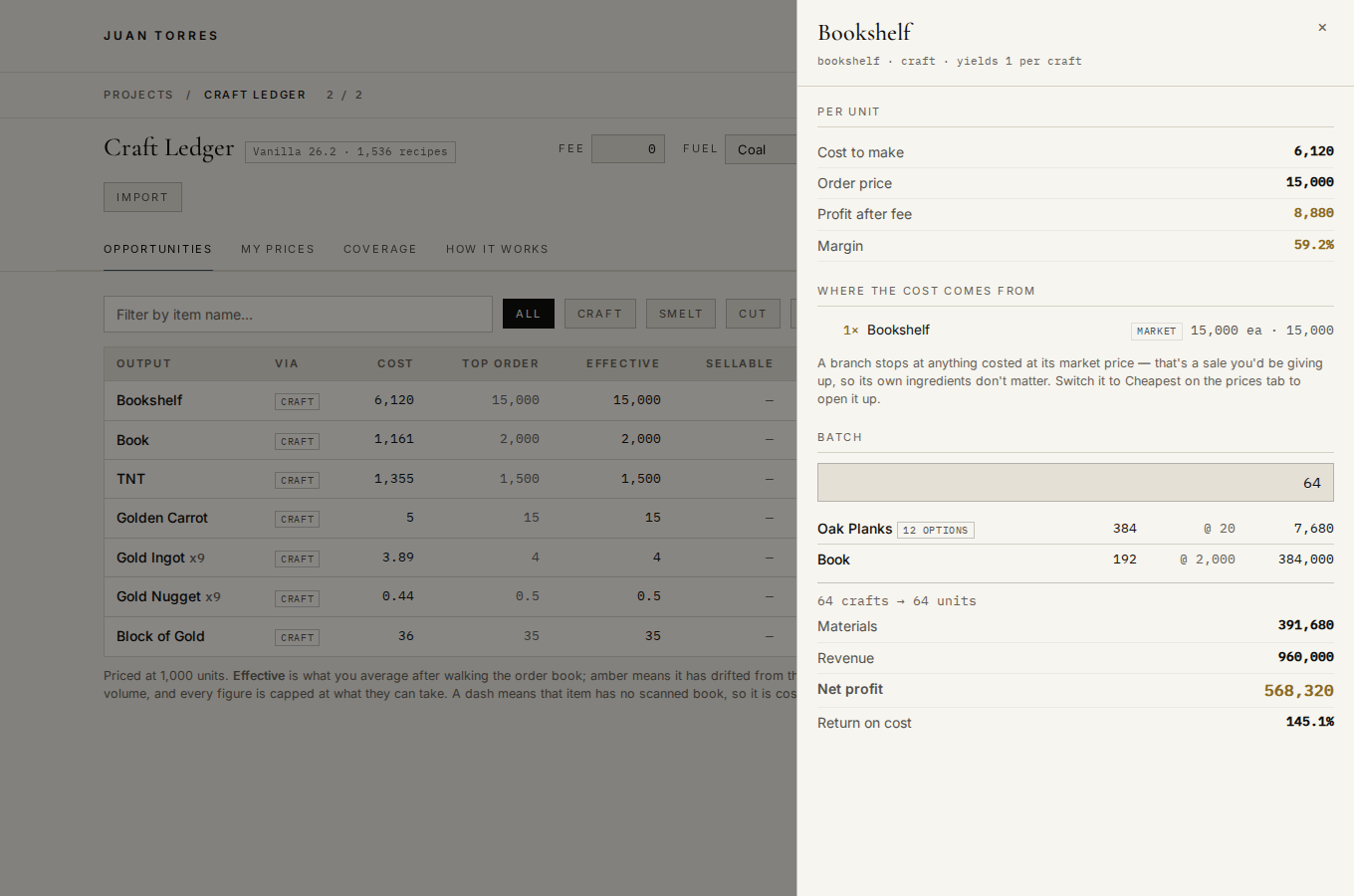
- Click a row for the cost breakdown and a batch calculator.
Which Minecraft crafts actually make money at your server's prices. Enter what you buy and sell at, and every vanilla recipe is ranked by what it really pays.
What to price next
Items you have not priced that no recipe can reach either. The number is how many more craftable items open up the moment you give it a price.
Every craftable item
A costing tool for crafting in a player market. Enter what the market charges for the things you trade, and it works out what every recipe actually costs you to make and what you clear on it.
Built against DonutSMP, but nothing in it is tied to one server. Any world where you can buy and sell materials will work — the prices are yours to set. There is a longer guide, with a worked example and notes for other kinds of servers, below the ledger.
Getting started
- Open My prices and enter the order price for everything you trade. Buy and sell are one number, since you fill on orders.
- Go to Opportunities. Every recipe you can now cost is ranked by what it pays.
- Click any row for the cost breakdown and a batch calculator.
You only ever enter prices. Recipes come from the game, so the more raw materials you price, the more of the list fills in on its own.
What a component really costs you
If you can sell a book for 2,000, then putting that book into a bookshelf costs you 2,000 — not the 1,161 it cost to craft. You gave up the sale. That is the default here, and it is what Market basis means.
Switch an item to Cheapest and it gets costed at whichever is lower, its order price or making it. The same bookshelf then reads 3,603 and 11,397, because the books are priced at what the paper and leather cost rather than at what they would have sold for.
Both are right, they answer different questions. Market tells you whether the last step is worth doing. Cheapest tells you whether the whole chain beats doing nothing. A recipe can pass one and fail the other.
Volume
The Volume box on the opportunities tab is the number of units you actually mean to move, and everything on that tab is priced at it. Each row walks the real order book for that many units rather than assuming the top order goes on forever.
This reorders the tab completely, and that is the point. An item whose best order wants nine units at a silly price looks like the best trade on the board at a volume of one, and vanishes at a volume of a thousand. Sorting by total profit at your real volume puts the thing worth doing on top.
Sellable is how many units the open orders can absorb. When it turns red the book runs out before your volume does, and the profit shown is only for the part that sells.
Reading the cost tree
Every recipe detail shows where its cost comes from, branch by branch. A branch stops at anything tagged market, because that is a sale you are giving up and its own ingredients no longer matter. Branches tagged crafted keep opening downward until they reach something you priced.
When a recipe accepts a group of items, like any plank or any log, it picks whichever one is cheapest for you and shows how many alternatives it had.
The fee and fuel controls
Fee is the cut taken off every sale, entered as a percent.
Fuel is a dropdown, not a price. Pick what you actually burn and the cost per item is worked out from that fuel's burn time and whatever you priced it at, so you never divide anything by hand. Price coal at 30 and pick Coal, and every smelt costs 3.75.
That is the same in a furnace, a blast furnace or a smoker. The fast ones cook in half the time but burn fuel twice as quickly, so one coal does 8 items in any of them. A campfire burns no fuel at all, so campfire recipes are never charged for it.
If the fuel you picked has no price yet the box says so, and smelting is costed without it. Set it to None if fuel is genuinely free to you.
Where the recipes come from
The full vanilla recipe set, read straight from the game's own data files. That covers crafting, stonecutting, smelting, blasting, smoking, campfire cooking and smithing, along with every item group a recipe can accept.
What it does not know
- Custom recipes. Only the vanilla recipe set is loaded. Anything your server has added or changed is not in here, and there is no way to add one yet.
- Whether your orders fill. Every figure assumes you transact at the price you entered. If your sell orders sit unfilled, the real opportunity cost is lower than shown and crafting looks better than the numbers say.
- Anything that is not a recipe. Mob drops, farming yield and time spent are all outside it. The per-craft figures are the whole story it can tell.
Coverage
The Coverage tab is the map of what is left. Every craftable item sits in one of three states: done means you have priced it and everything it needs, no sell price means you can already cost it but have not said what it sells for, and blocked means something further down is unpriced. Blocked rows show what they are waiting on.
What to price next ranks the missing items by how many craftable items each one would open up. That number is measured, not guessed — it re-runs the whole graph with that one item priced and counts the difference. Price the top of that list and the largest part of the tree comes alive at once.
How old a price is
Every price is stamped when you set it, and the Set column on the prices tab shows its age. Anything past a week turns amber and past a month turns red. Coverage counts the stale ones for you.
This matters more than it sounds. A price you entered three weeks ago is being treated as fact by every recipe that touches it, and one stale entry deep in a chain quietly skews everything above it.
Order book depth
A price is only worth what it can absorb. If the best order wants 580 units and you are making 5,000, the rest sells into worse orders further down the book and your real average is nothing like the top price.
When the scanner supplies depth, the batch calculator walks the book instead of assuming the top price holds forever, and shows the effective price per unit next to it. If the open orders cannot take the whole batch it says how many units are left over rather than pretending they sold.
The Depth column on the prices tab turns red under a thousand units. That is the warning that a price is real but thin.
Orders already filled are ignored. A completed order still shows in the book but cannot take another unit, so letting it set the price would quote you a number nothing can actually be sold at.
When an item arrives with a book, its price is set from the best live order in that book, so the headline figure and the volume maths can never drift apart.
Importing from the scanner
Import takes either file the scanner writes. craft-ledger-prices.json carries
prices, timestamps and the order book. history.csv carries every capture ever made; it
loads the most recent price for each item and keeps the high and low it has seen.
Linking the scanner
Link scanner points this page at craft-ledger-prices.json once. After that it
re-reads that file every fifteen seconds and whenever you reload, so a sweep in game shows up here
without importing anything. The badge next to the button says how long ago it last read.
Chrome and Edge only — the file access it needs does not exist in Firefox or Safari, so the button is hidden there. Import still works everywhere, including on a phone: put the file in iCloud Drive or Google Drive and pick it through the Files app.
Browsers forget file permission when you close the tab, so the first load after reopening asks you to click Link scanner again. That is a browser rule, not a setting.
Where your prices live
In this browser, on this device, and nowhere else. Nothing is uploaded. That also means a phone and a laptop keep separate sets, and clearing browser data wipes them.
Use Export for a backup file and Import to load it somewhere else. Worth doing once you have real numbers in.
Order books are stored as price levels rather than individual orders — ten orders at the same price spend down identically, so keeping them apart only wastes space. If storage fills anyway, prices and settings stay saved and only the depth data falls back to reloading from the linked file.
Made by AlAkhirah. Prices are yours to keep; the recipes are the game's.
Which Minecraft crafts actually make money
Craft Ledger is a free crafting profit calculator for SMP economies. Enter the prices your server trades at and it ranks every vanilla recipe by what it really pays, counting each ingredient at what you could have sold it for instead. It was built on DonutSMP and works on any server with an auction house, order board or player shops.
Every SMP economy has the same question under it: is it worth crafting this, or should I just sell the materials? Craft Ledger answers that for all 2,770 craftable items at once. You never enter a recipe. The full vanilla recipe set is built in, read from the game's own data files, so the more raw materials you price, the more of the list fills in on its own.
For each craft it shows the cost to make, the price it sells for, profit per unit, margin, and total profit at the volume you actually intend to move. Click any row for the cost tree, which shows exactly where every coin of the cost comes from, and a batch calculator that walks the order book instead of assuming the top price holds forever.
How to use it on DonutSMP
- Open the ledger and go to My prices. Type an item name and enter the price it trades at on the auction house or order board. Buy and sell are one number, because you fill on orders. Start with the raw materials you handle most: logs, ingots, leather, paper, sugar cane.
- Set the fee. If the server takes a cut of every sale, enter it as a percent in the Fee box at the top. It comes off every profit figure.
- Pick your fuel. Fuel is a dropdown, not a price. Choose what you burn and every smelt is charged from that fuel's burn time and the price you gave it. One coal smelts eight items in a furnace, a blast furnace or a smoker alike (the fast ones burn fuel twice as quickly), and a campfire burns none.
- Read Opportunities. Set Volume to the number of units you mean to move. An item whose best order wants nine units at a silly price looks like the best trade on the board at a volume of one and vanishes at a volume of a thousand. Sort by total profit at your real volume and the thing worth doing is on top.
- Check Coverage. It lists the items you have not priced, ranked by how many craftable items each one would unlock. Price the top of that list and the biggest part of the tree comes alive at once.
Prices go stale. Every price is stamped when you set it; anything past a week turns amber and past a month turns red, and a stale price deep in a chain quietly skews everything above it. Refresh the ones that matter before you commit to a large batch.
Other servers it works on
Nothing in it is tied to one server. The prices are yours to set, so it works anywhere players trade in a currency:
- Lifesteal and survival SMPs with an auction house (DonutSMP and servers built like it). Use the going order prices.
- Servers with chest shops or admin shops. Use the shop's buy price for what you buy and its sell price for what you sell; switch an item's basis to Cheapest if buying is cheaper than making.
- Private SMPs with a player-run economy. Use whatever your friends have agreed on. The ledger is a good way to notice when a price is off.
- Skyblock-style servers with a bazaar. Vanilla recipes only, so custom items and modified recipes are not covered, but the plain crafting and smelting chains are.
The one hard limit: it knows the vanilla recipe set and nothing else. A server that changes recipes or adds custom items will not have those in the list.
A worked example
Say books sell for 2,000 on your server and a bookshelf sells for 15,000. It costs 1,161 to craft a book from paper and leather, so the tempting sum is six planks plus three books at 1,161, about 3,600, against 15,000. That is not what the bookshelf costs you. If you can sell a book for 2,000, putting it into a bookshelf costs you 2,000, because you gave up the sale.
- 6 oak planks at 20: 120
- 3 books at their 2,000 order price: 6,000
- Bookshelf costs 6,120 and sells for 15,000
- Profit on the bookshelf step: 8,880
That is Market basis, the default: every component is counted at what you could have sold it for. Switch the book to Cheapest and the same bookshelf reads 3,603 cost and 11,397 profit. Both are right; they answer different questions. Market tells you whether the last step is worth doing. Cheapest tells you whether the whole chain beats doing nothing. A recipe can pass one and fail the other, and the ledger shows you which.
Questions people ask
Is it free?
Yes. No account, no sign-up, no ads. It is a page on this site.
Where do my prices go?
Nowhere. Everything is stored in your own browser. Export writes a file you keep; Import reads one back. Nothing is sent to a server, including this one.
Does it know my server's prices?
No. Prices differ on every server and change every week, so it only uses what you enter. If you run a scanner that writes prices to a file, Link scanner reads that file so you never type them at all.
Which recipes are included?
Every vanilla recipe in the current game version: crafting, stonecutting, smelting, blasting, smoking, campfire cooking and smithing, plus every item group a recipe accepts. Custom server recipes are not included.
Does it work on a phone?
Yes. Add it to your home screen from the browser's share menu and it opens like an app, with your prices kept on the device.
Something is wrong or missing
Email me at Torre10j@cmich.edu with the item and the price you entered, and I will look at it.